
HJ-1501
* Audio PCB Board / Sound System Board
* Bluetooth Speaker PCB
* Amplifier Board / Power Amplifier PCB
Master VOL
Channel 1: Music.
Music VOL; Treble; Bass;
Channel 2: MIC.
MIC VOL; MIC Treble; MIC Bass; MIC EFFECT
Channel 3: Guitar/Instrument
GT VOL; GT Treble; GT Bass; GT EFFECT
from left to right:
1. Two arrows indicate:Mode switching
2. 《Repeat 》 Short press to repeat the song
3. 《M.PRI》MIC priority
4. 《Previous Song》 Short press to go to the previous song/long press to fast rewind.
5. 《Pause/Play》 Short press to pause in U disk mode/short press to search channels automatically in radio mode.
6. 《Next Song》 Short press to go to the next song/long press to fast forward.
1. 《USB》Supports MP2, MP3, WMA, APE, FLAC, AAC, MP4, M4A, WAV,AIF, AIFC, etc.
2. OTG: LIVE and DATA;
3.AUX audio signal input.
4. Line In
5. Line out
6. XLR1:Wired microphone 1 input interface.
7. XLR1:instrument 1 input interface.
8. 《Charging Interface》AC 110V-220V/ 50HZ -60HZ
9.《Power Switch》
10. 《Charging Indicator Light》Charging: blue, full: green, undervoltage: red.

self developed audio amplifier board PCB board, OEM will be OK

Title
I'm a paragraph. I'm connected to your collection through a dataset. Click Preview to see my content. To update me, go to the Data Manager.
You can get more out of your site elements by making them dynamic. To connect this element to content from your collection, select the element and click Connect to Data. Once connected, you can save time by updating your content straight from your collection—no need to open the Editor, or mess with your design.
Add any type of content to your collection, such as rich text, images, videos and more, or upload a CSV file. You can also collect and store information from your site visitors using input elements like custom forms and fields. Collaborate on your content across teams by assigning permissions setting custom permissions for every collection.
Be sure to click Sync after making changes in a collection, so visitors can see your newest content on your live site. Preview your site to check that all your elements are displaying content from the right collection fields. Ready to publish? Simply click Publish in the top right of the Editor and your changes will appear live.
You can get more out of your site elements by making them dynamic. To connect this element to content from your collection, select the element and click Connect to Data. Once connected, you can save time by updating your content straight from your collection—no need to open the Editor, or mess with your design.
Add any type of content to your collection, such as rich text, images, videos and more, or upload a CSV file. You can also collect and store information from your site visitors using input elements like custom forms and fields. Collaborate on your content across teams by assigning permissions setting custom permissions for every collection.
Be sure to click Sync after making changes in a collection, so visitors can see your newest content on your live site. Preview your site to check that all your elements are displaying content from the right collection fields. Ready to publish? Simply click Publish in the top right of the Editor and your changes will appear live.
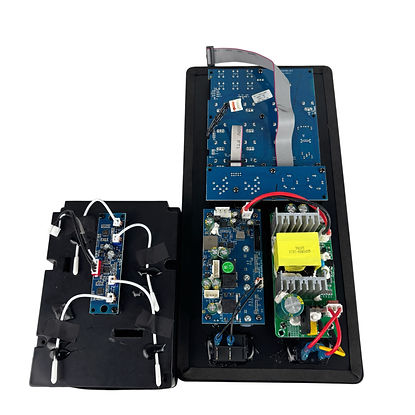
self developed audio amplifier board PCB board, OEM will be OK
HJ-1501
* Audio PCB Board / Sound System Board
* Bluetooth Speaker PCB
* Amplifier Board / Power Amplifier PCB
Master VOL
Channel 1: Music.
Music VOL; Treble; Bass;
Channel 2: MIC.
MIC VOL; MIC Treble; MIC Bass; MIC EFFECT
Channel 3: Guitar/Instrument
GT VOL; GT Treble; GT Bass; GT EFFECT
from left to right:
1. Two arrows indicate:Mode switching
2. 《Repeat 》 Short press to repeat the song
3. 《M.PRI》MIC priority
4. 《Previous Song》 Short press to go to the previous song/long press to fast rewind.
5. 《Pause/Play》 Short press to pause in U disk mode/short press to search channels automatically in radio mode.
6. 《Next Song》 Short press to go to the next song/long press to fast forward.
1. 《USB》Supports MP2, MP3, WMA, APE, FLAC, AAC, MP4, M4A, WAV,AIF, AIFC, etc.
2. OTG: LIVE and DATA;
3.AUX audio signal input.
4. Line In
5. Line out
6. XLR1:Wired microphone 1 input interface.
7. XLR1:instrument 1 input interface.
8. 《Charging Interface》AC 110V-220V/ 50HZ -60HZ
9.《Power Switch》
10. 《Charging Indicator Light》Charging: blue, full: green, undervoltage: red.
PUBLISHED


